Cull Me uP Lab · workflow
Your decisions shouldn't be trapped in one app.
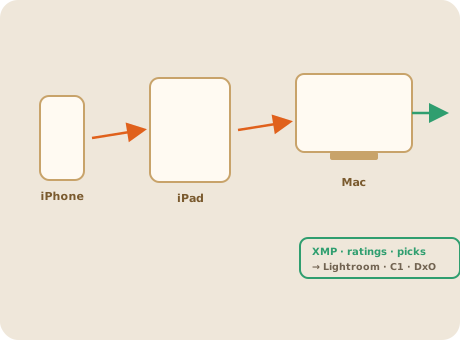
Cull Me uP isn't a new closed catalog. Picks, rejects, ratings and metadata move forward — into Lightroom, Capture One, DxO. And the first pass flows across iPhone, iPad and Mac. It makes your editor start from a better place.
Cull Me uP doesn't compete with your editor — it makes your editing session start from a better place.
What stays under your control
A workflow enhancer, not a trap.
01
Your files stay files
A file-respecting workflow — not a heavy proprietary catalog that becomes one more thing to manage.
02
Non-destructive by default
Rejects, maybes and selections stay understandable and reversible. Nothing important vanishes silently.
03
Metadata that travels
Picks, rejects, stars and colors move forward as portable XMP — into Lightroom, Capture One, DxO and the rest of your workflow.
04
Apple-native continuity
Start on iPhone where the shoot is fresh, review on iPad, finish on Mac — one continuous first pass.
What we deliberately don't do
No Lightroom clone. No DAM. No black-box.
Good product design is knowing where to stop. Cull Me uP doesn't replace the editor, own the archive, or become an all-purpose database. It is the missing step between the card and the edit.
Better input. Cleaner editing session.
Cull Me uP improves the moment before the editor, so the editor receives the right images in a clearer structure.